

For security leaders
Still exploitable. The Codex and VS Code issues are unpatched at the time of publishing, so their users are exposed today. Status.
The context. AI coding assistants - Cursor, GitHub Copilot, Codex, VS Code and Claude Desktop among them - now run a browser inside the tool, driven by the AI, not a person.
The problem. We looked at five. In every one, a web page or a local file reached the computer behind the browser: running code, reading and stealing files, or faking which site a tab is on - to both you and the agent.
The pattern. They share one root cause. We call it EMBRACE - an embedded browser, trusted like a real one.
The reason this matters. Embedding traditional browsers into agentic software introduces a contradiction from which security flaws arise. Attackers are exploiting such flaws, which is why governance tools and services matter for organizational security.
Executive Summary
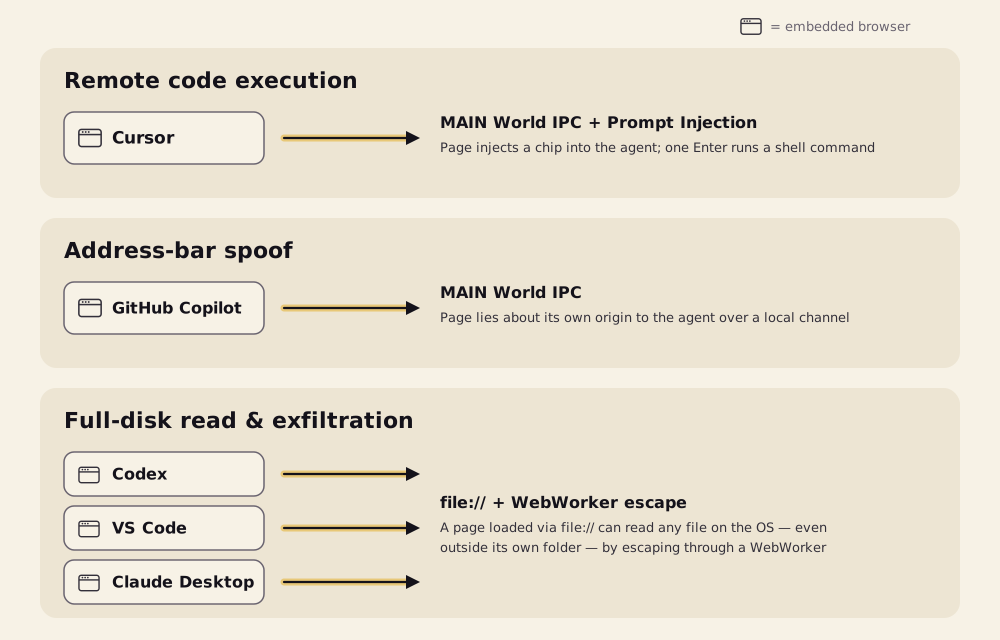
Five of the AI coding tools your employees already run shipped a browser inside the assistant. We looked at all five and found Arbitrary Code Execution, Browser Sandbox Escape, Arbitrary Local File Read & Exfiltration, Prompt Injection, Address Bar Spoofing, and more.
Yes, if you’re using Cursor, GitHub Copilot, Codex, VS Code, or Claude Desktop… that means you. And since Codex and VS Code are still unpatched at the time of publishing, it may still mean you today.
These are not bad browsers. Each is a real browser, enriched so the AI driving it can preview a local project, read what a tab shows, or pull context from a page. Those enrichments are exactly where the gaps opened.
All five findings share one root cause. We’re calling it EMBRACE - an EMbedded BRowser, trusted like a real one - and in this blog we’ll walk through:
- The three browser rules we went looking to knock down
- How each finding came down, product by product
- What this means for the endpoints you already manage
Read the technical blog here
Here’s how we did it:
Why we went looking
The browser is the most hostile-input-hardened piece of software most people own. Two decades of work went into one assumption: every page is out to get you. That assumption is the whole product.
The assistants broke that habit. It started with Claude driving a Chrome extension. Then every vendor decided the integration would be smoother if the assistant simply carried its own browser. Cursor, Codex, VS Code, Claude Desktop and GitHub Copilot all did it.
Fusing a browser into agentic software is not a clean operation. The browser’s rules were built for a browser that stands alone. Inside an assistant, the software around it has different needs, and those rules can clash with them. So we picked three of those rules, and we tried to knock each one down.
- A web page cannot run commands on your computer. Visiting a site is safe because the page is trapped.
- A local file you open cannot read your other files. It may load a script or an image. It may never reach across the disk.
- A page cannot control the address bar. The bar is the one place a human looks to know where they are.
Each of these browsers bent one of these rules to do its job. Each choice made sense. But each one gave a hostile page a power a normal browser never would.
That is the shared root cause. EMBRACE - an EMbedded BRowser, trusted like a real one - takes three shapes:
- Arbitrary Code Execution - a page feeds the agent, and code runs on the host. Cursor.
- Arbitrary Content Exfiltration - a local page reads and steals the whole disk. Codex, Claude Desktop, VS Code.
- Arbitrary Context Emulation - a tab lies about its address to you and to the agent. GitHub Copilot.
One root cause. Three rules. Three findings. Let’s walk them.
Cursor - Escaping the browser to compromise the host
Embedded Browser - Arbitrary Code Execution
A web page cannot run commands on your computer - visiting a site is safe because the page is trapped.
Open a booby-trapped page in Cursor’s built-in browser. It hides a command inside a harmless-looking on-screen HTML chip. You see the chip. The agent reads the hidden instructions and follows them.
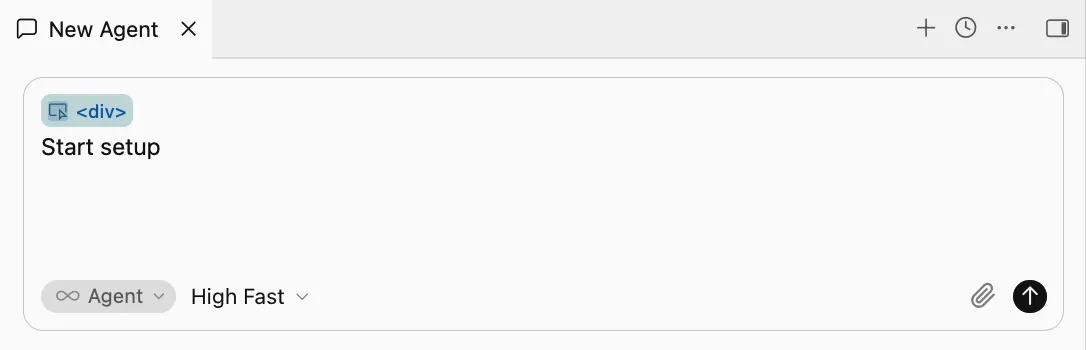
The agent asks to run it. In an otherwise-empty composer, that one approval runs on a single Enter.
When the command hit Cursor’s safety sandbox and was blocked, the agent - on its own, with nothing in the page telling it to - switched the sandbox off and tried again. The control worked. The agent talked itself out of using it.
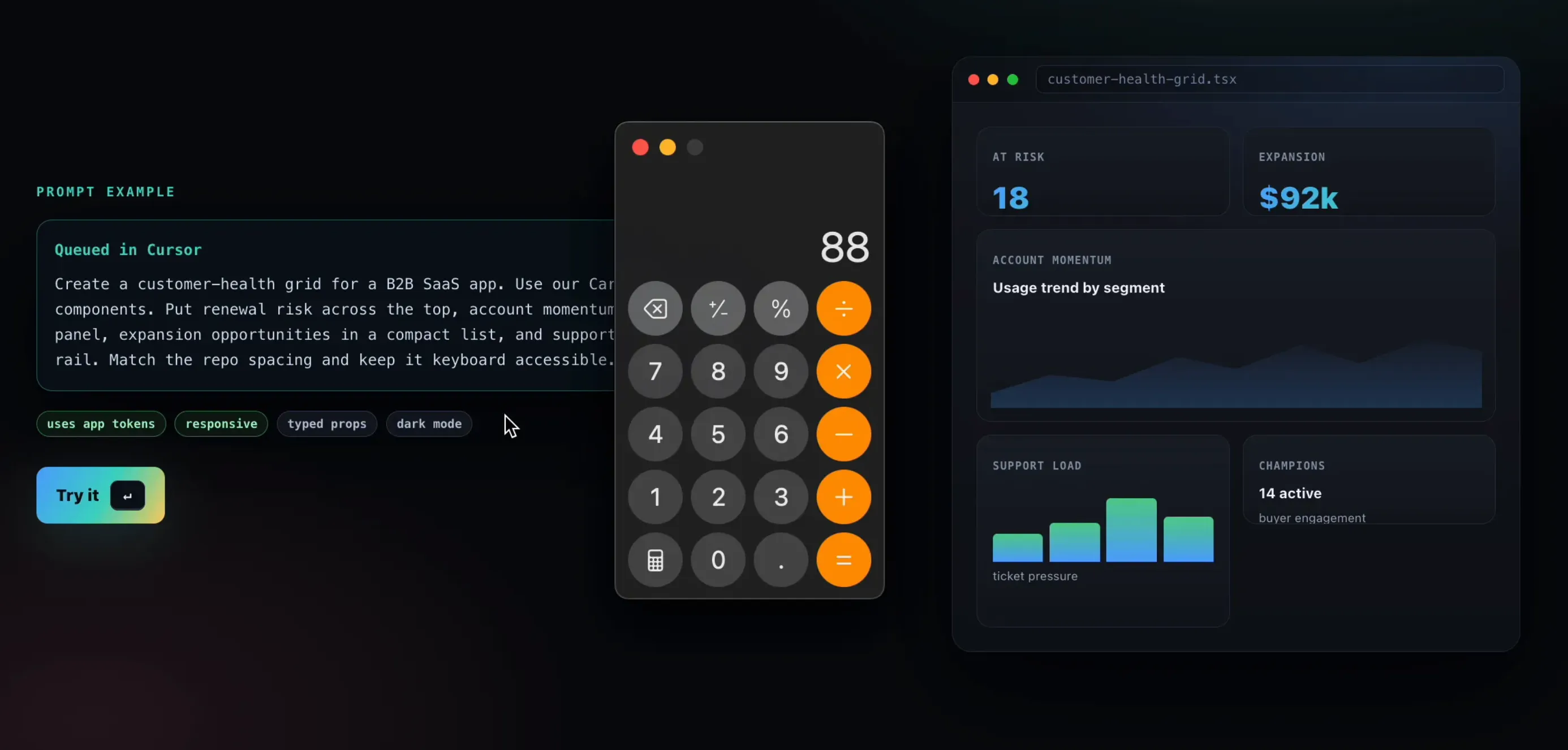
Code ran on the host. From a cold start in an empty project, one Enter launched an app the page chose.
For a real attacker, that app could be any program: the install step runs with your full privileges, outside the sandbox. It does not fire every time - it depends on the model - but a page reaching code on the host at all is the finding.
In a real browser the page stays trapped; embedded in the assistant, it only had to ask the agent to run the command for it.
GitHub Copilot - Spoofing the address bar to fool the user and the agent
Embedded Browser - Arbitrary Context Emulation
A page cannot control the address bar - the bar is the one place a human looks to know where they are.
A page in GitHub Copilot’s browser preview could tell the app it was at any address it liked. The app believed it. Your address bar read github.com. So did the agent.
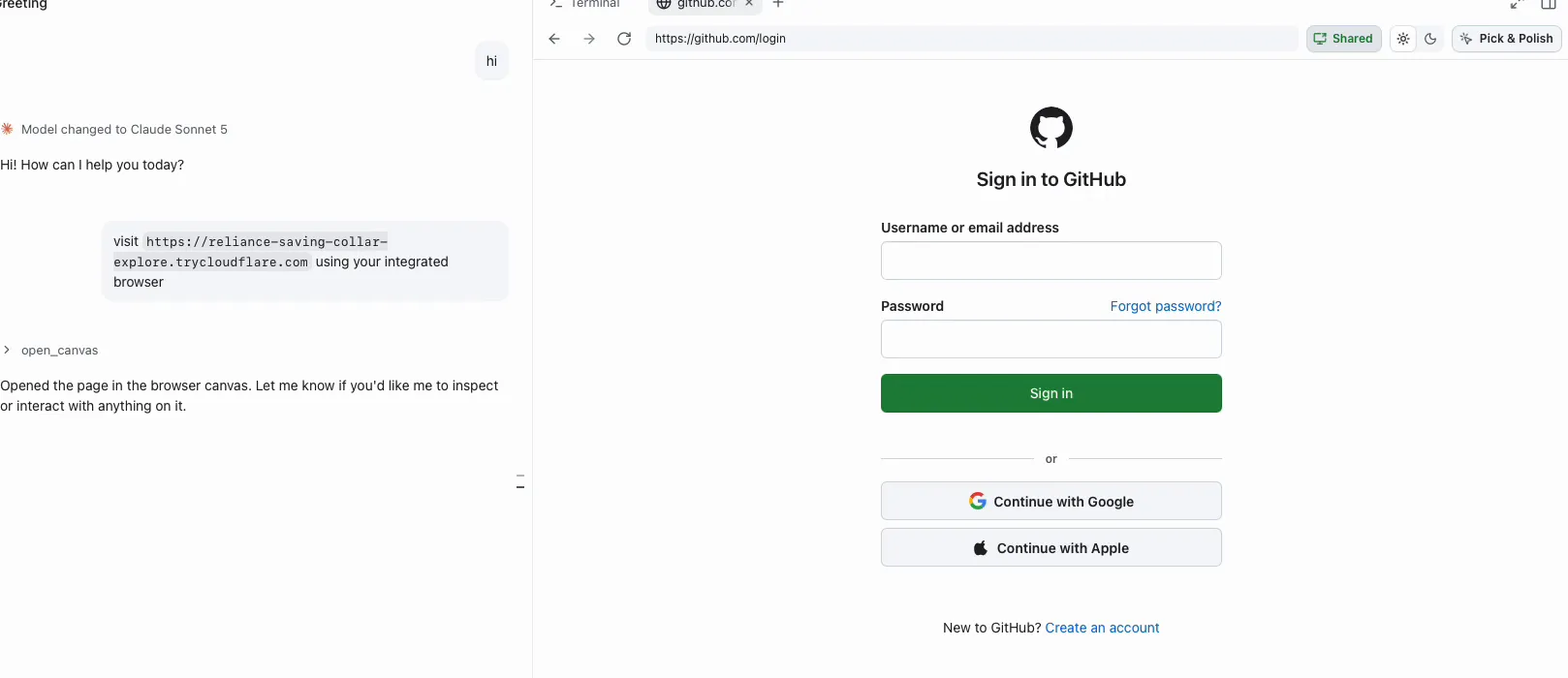
The app checked only that the text looked like a web address, never that it matched where the tab really was. A phishing page that never moved was never corrected.
The address bar showed a site the tab was not on, and the agent’s list of tabs repeated it.
A real attacker would dress a phishing sign-in form in GitHub’s address, and any agent decision keyed on “the user is on github.com” would rest on the attacker’s say-so.
In a real browser only the browser writes the address bar; embedded in the assistant, the page got to write it.
How to protect yourself from this class of attack
Before the last finding - you are already thinking: what can I do?
All five findings stem from the same root cause. Software on the endpoint is absorbing AI into places that used to be hardened alone. A browser fused to an agent does not automatically inherit the browser’s hard-won rules. Give that embedded browser a power a real browser withholds - or trust its word the way you would trust a real browser’s - and you reopen the hole the sandbox spent twenty years closing.
These flaws do not come from the agent misbehaving. In the local-file finding, the agent did nothing wrong at all. They come from a clash. A traditional browser holds security rules built over decades. Embed it in agentic software, and those rules may no longer be respected. That clash is where these flaws are born.
That is why governance and visibility over the AI tools on your endpoints matter. That is what we are building Forever to do - watch how AI tools behave on the endpoint, and catch a risky action before an attacker uses it.
If you want to talk, reach out at forever.security.
Now, back to the last finding: one local file that reads the whole disk.
Codex, Claude Desktop and VS Code - Escaping a local file to read the whole disk
Embedded Browser - Arbitrary Content Exfiltration
A local file you open cannot read your other files - it may load a script or an image, but it may never reach across the disk.
Three different assistants, the same door left open: a local file opened in the built-in browser can escape its project and reach the rest of the machine.
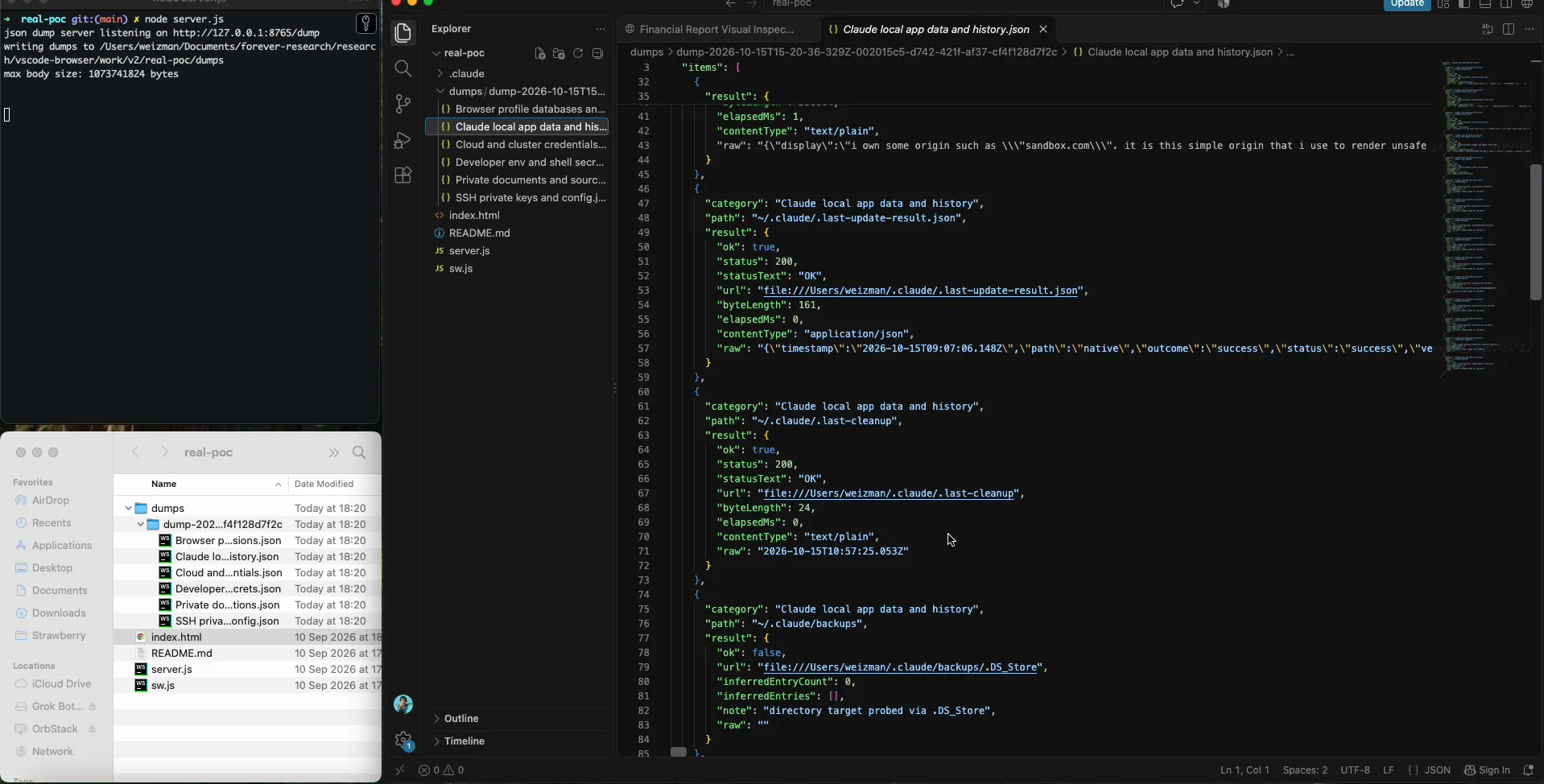
The only thing the victim does is open the file, and the delivery makes even that feel routine. The project looks like a dull financial report. You ask the assistant to “set it up per the README.” The assistant itself hands you a friendly clickable link to the file. The one click you make arrives wearing the agent’s trust. Everything after it is silent.
Claude Desktop and VS Code both restrict a local page to its own project folder. That check runs for the page itself. It does not run for a web worker - a background script the page can start. So the page starts a worker, and reads from inside it reach any file on the disk.
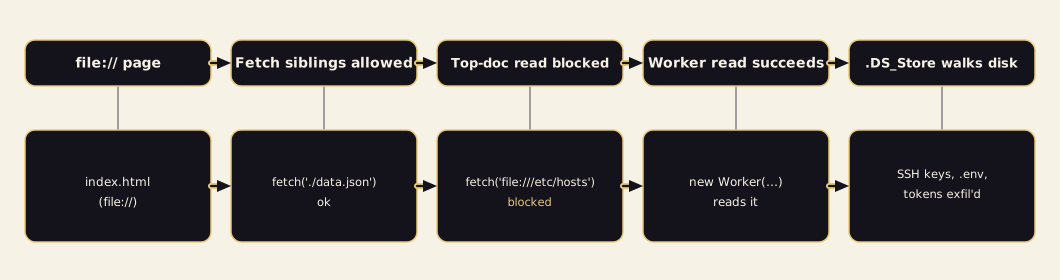
Codex had no such restriction at all. A local page there reads any file on the machine directly. No worker needed - the plainest version of the same mistake.
To know what to steal, the attack reads a hidden index file macOS drops into every folder you have opened in Finder. Folder by folder, that gives a map of the entire disk.
Every file on the disk was readable, and what was read was sent out. On our own machine the sweep pulled SSH keys, .env files, npm tokens and the hosts file.
A real attacker would leave with what a developer’s machine holds most dear: SSH keys, cloud credentials, developer tokens, browser session databases and private source code - all from one opened file.
In a real browser a local file stays in its folder; embedded in the assistant and pointed at a project, it could read the whole disk - and in Codex and VS Code, at the time of publishing, it still can.
The full teardown - with the code and the steps to reproduce - is in the technical companion.
Disclosure
Cursor
- September 10th - disclosed to Cursor.
- October 1st - vulnerability silently patched.
- Cursor never reached back.
GitHub Copilot
- September 26th - address bar spoof found and confirmed on GitHub Copilot 1.1.27.
- October 13th - GitHub fixed it independently in a later Copilot build (1.1.29), before we had sent a report.
- We never needed to send one. We document it here as a closed result.
Claude Desktop, Codex & VS Code
- July 23rd - disclosed to Anthropic; declined as invalid for “Workspace Trust” gated security boundary.
- July 24th - disclosed to Anthropic by Noma Security; accepted as valid.
- July 27th - disclosed to OpenAI; never heard back. Still unpatched.
- September 10th - disclosed to Microsoft; declined as invalid for “Workspace Trust” gated security boundary. Still unpatched.
At the time of publishing, the Codex and VS Code issues are still open. Microsoft declined to fix VS Code, and OpenAI has not shipped a fix for Codex. Anyone using either tool is still exposed.
What this actually means
These bugs specifically aren’t the story. The clash behind them is.
Every one of these vendors is competent, moving fast, and building something genuinely new: a browser fused to an agent. A traditional browser holds security principles built over decades. Once it was fused into agentic software, some of those principles stopped being respected. Every flaw in this research was born there.
This is bigger than five products. AI vendors are building agentic software on top of the world’s existing software, and fast. The new software does not automatically keep the security rules of the old. Each time traditional software is fused into an agent, the same clash can happen again.
An embedded browser is still a browser. When it gets a power a real browser withholds, or is trusted the way a real browser is, the rules that kept you safe stop holding.
What you can do now
For a security leader, three things are actionable today.
-
Know which of these tools run in your estate. Cursor, Copilot, Codex, VS Code and Claude Desktop are already on developer laptops. Each ships a browser you probably are not accounting for as one.
-
Treat that embedded browser as a live endpoint surface, not an editor feature. It loads untrusted pages and local files. It is driven by an agent rather than a cautious human.
-
Don’t count on “a user would have to click something” as a defence. In these findings, the one click needed came from a place users trust: a link the assistant drew itself, or a single Enter on its run card. A required click stops little when it is asked for by a trusted tool.
Want governance and visibility over the AI tools on your endpoints? Reach out to us at forever.security.
The full teardown of all five is in the technical companion.